

Cloud Based Classroom Management
- Netsupport
- Cyber Security

Affordable Classroom Instruction, Online Safety & IT Management – All in One
Say goodbye to edtech fatigue with classroom.cloud, the award-winning 3-in-1 solution designed for real impact.
It offers simple, powerful tools for teaching, safeguarding, and managing school IT—anytime, anywhere.
Classroom Instruction
Designed with teachers in mind, classroom.cloud makes delivering engaging lessons effortless—whether in-person or remote. With tools for real-time instruction, assessment, collaboration, and behavior management, it adapts to any learning environment.
Online Safety
Keep students safe online with the optional safety toolkit. Designated staff can monitor activity, detect risks, and identify trends—supporting a secure learning space and helping schools meet key safeguarding requirements.
IT Management
Quick to deploy and easy to manage, classroom.cloud integrates with your existing systems. Centralize device management, track usage, and optimize resources—saving valuable time and costs.
Take a closer look at Classroom.cloud
Key Features of Classroom.Cloud
Flexible Classroom Instruction
- Instantly connect to student devices using multiple methods for a quick start to teaching.
- Broadcast your screen and audio to explain activities clearly and efficiently.
- Engage students in real-time with chat, messaging, help requests, surveys, screen control, and more.
Student Monitoring & Control
- View student screens, keystrokes, web/app usage, and collaboration in real time.
- Lock screens, block webcams, and control sound for focused learning.
- Set “allowed/restricted” lists for websites and applications; manage USB use and reset passwords without IT help.
Seamless Integration & Platform Support
- Multi-platform compatibility supports a mix of devices and future-proofed tech use.
- Integrates with Microsoft SDS, ClassLink, and Google Classroom for quick, flexible setup.
IT Management Tools
- Technician tools include software inventory, remote control, audit logs, and activity tracking.
- Chronological view of user logins and usage patterns helps IT teams optimize support.
Smart Power Management
- Reduce energy costs by scheduling device power on/off, restart, or logoff actions—ideal for end-of-day routines.
Scalable & Cost-Effective
- A low-cost solution that scales easily from small schools to large MATs.
- Supports both in-school and remote learning with a consistent set of tools.
Classroom Instruction
For Teaching Staff
classroom.cloud makes blended learning simple with easy-to-use, cloud-based tools that support both in-class and remote teaching. Its real-time instruction, assessment, collaboration, and monitoring features allow learning to happen seamlessly—whether synchronously or asynchronously—giving teachers and students the flexibility to adapt to any learning environment.
Key Features of Online Safety
- Share your screen and audio to guide lesson activities
- Monitor student screens in real time to keep them focused
- Respond to help requests instantly for quick support
- Encourage participation with chat and messaging tools
- Gamify assessments using live student surveys
- Manage access with website and application controls
- Remotely control student screens when needed
- Restrict or disable USBs, webcams, and audio during class
- Lock screens to capture attention instantly
- Power off, restart, or log out student devices individually or in bulk
- Reset student passwords without needing IT support
- Remotely log in to Windows student devices
Online Safety
For online safety staff
Ensuring a secure digital learning space is easier with classroom.cloud. Its online safety tools actively monitor concerning activity, identify at-risk students, and detect emerging trends—helping schools maintain a safe environment. These features support your safeguarding strategy and assist in meeting compliance with the latest online safety requirements.
Key Features of Classroom Instruction
Keyword & Phrase Monitoring
Monitor over 14,000 safeguarding terms across multiple languages—including in Microsoft Teams—to detect early signs of risk or concern.
Keyword Cloud
Triggered keywords automatically populate a visual cloud, helping staff easily identify trending topics and potential issues.
Student ‘Report a Concern’
Empower students to confidentially report wellbeing or safety concerns directly to trusted staff members.
Custom Keyword Updates
Add school-specific keywords to the database and share them across your trust or district for tailored safeguarding.
Online Safety Groups
Create focused monitoring groups (e.g. by year or vulnerability level), apply custom settings, and send alerts to designated staff.
Online Support Resources
Provide students instant access to resources on topics like bullying, grooming, drug abuse, and more. Schools can customize and expand this list.
Risk Index with Contextual Intelligence
Analyze the full context of each triggered event (time, device, apps used, browsing history) to assign a risk level—integrates with MYCONCERN and CPOMS.
Security & Confidentiality
Set strict access permissions, generate sensitive reports, and blur images/screenshots to maintain student confidentiality and data privacy.

IT Management
For IT & Network Staff
classroom.cloud simplifies school IT management with fast deployment, easy integration, and minimal maintenance. Whether managing a single school or an entire district, IT teams can centrally monitor and support devices, optimize resource usage, and ensure efficient operations. Key tools include remote control, power management, hardware/software inventories, and more.
Multi-Platform Ready
Supports a wide range of devices—keeping your infrastructure flexible, scalable, and ready for future tech changes.
Beyond the LAN
classroom.cloud breaks free from LAN limitations, enabling secure device connectivity across multiple sites without server dependency—no more firewall struggles.
Key Features of IT Management tools
- Power on/off, restart, or log off devices with Power Management – schedule actions for efficiency
- View detailed hardware and software inventory
- Remotely control devices to troubleshoot or assist users
- Use Activity Monitor (BETA) to track app/web usage and login history
- Hosted securely on Microsoft Azure cloud infrastructure
- Create and manage acceptable use policies for students and staff
- Integrate seamlessly with Microsoft SDS, ClassLink, Clever (US only), and Google Classroom
- Create classes on behalf of teachers for easy onboarding
- Send messages to individual students or multiple devices instantly
- Reset user passwords without involving external support
- Apply school-wide internet restrictions with custom access times
- Low cost, low maintenance solution built for education budgets
- Multi-platform support for all major operating systems
- High performance and scalable to support schools of any size
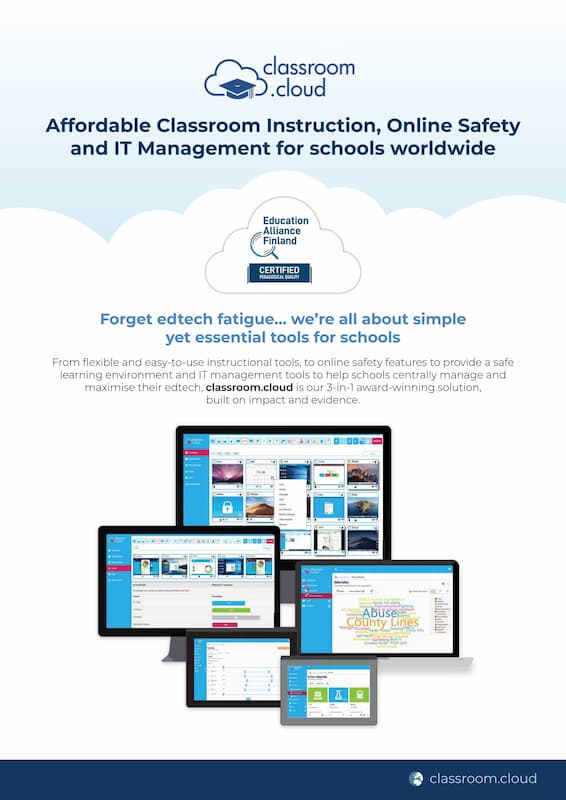
Download Corporate Brochure
Classroom.cloud by NetSupport
Explore an all-in-one solution that combines flexible instructional tools, robust online safety features, and powerful IT management capabilities—designed to help schools create a safe, efficient, and tech-enabled learning environment.