
Mobile Device Management Solutions in Saudi Arabia
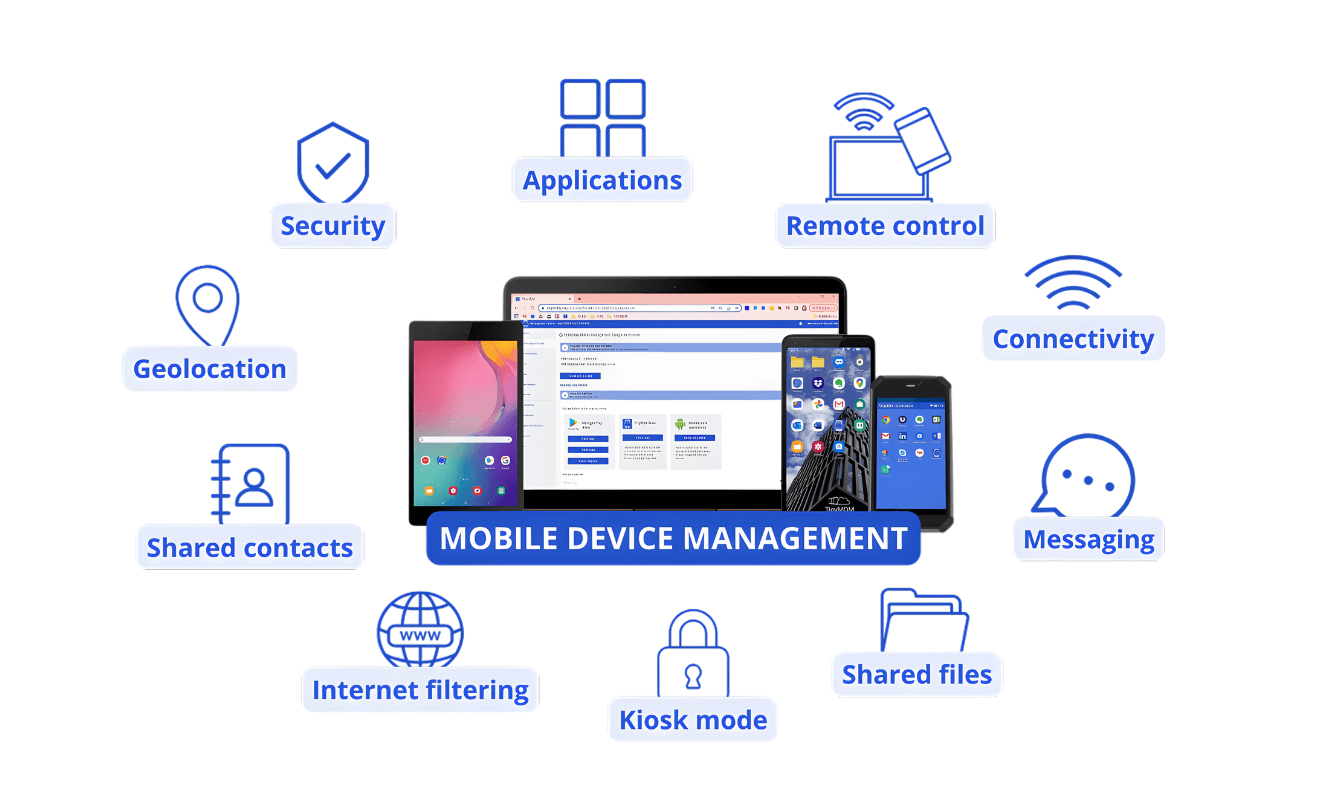
Mobile device management (MDM) is the discipline of centrally securing, monitoring, and controlling every endpoint that touches your organization’s data — whether that is a company-issued smartphone, an employee’s personal laptop, a warehouse scanner, or a field tablet. As Saudi enterprises expand across sites and adopt hybrid work, unmanaged devices have become one of the most common vectors for data breaches, policy non-compliance, and IT operational overhead.
Bluechip-Saudi helps organizations across Riyadh, Jeddah, Dammam, and the wider Kingdom design and deploy enterprise MDM solutions that fit their specific environment. We work with leading unified endpoint management platforms — including 42Gears SureMDM — to give your IT team full visibility and control over every device in your fleet, regardless of operating system, device type, ownership model, or user location.
What is MDM?
Why Mobile Device Management — The Saudi Arabia Context
Why Endpoint Control Has Become Non-Negotiable for Saudi Enterprises
A decade ago, most Saudi organizations managed a predictable estate of office-based desktops and company-issued laptops. Today, that picture looks very different. Employees work from home, from client sites, from hotel Wi-Fi, and from personal devices they bought themselves. Warehouses run on Android handhelds. Field engineers carry ruggedized tablets. Contractors bring their own smartphones into secure facilities. Each of these endpoints is a potential point of failure — and without centralized management, your IT team has no reliable way to enforce security, respond to incidents, or maintain compliance.
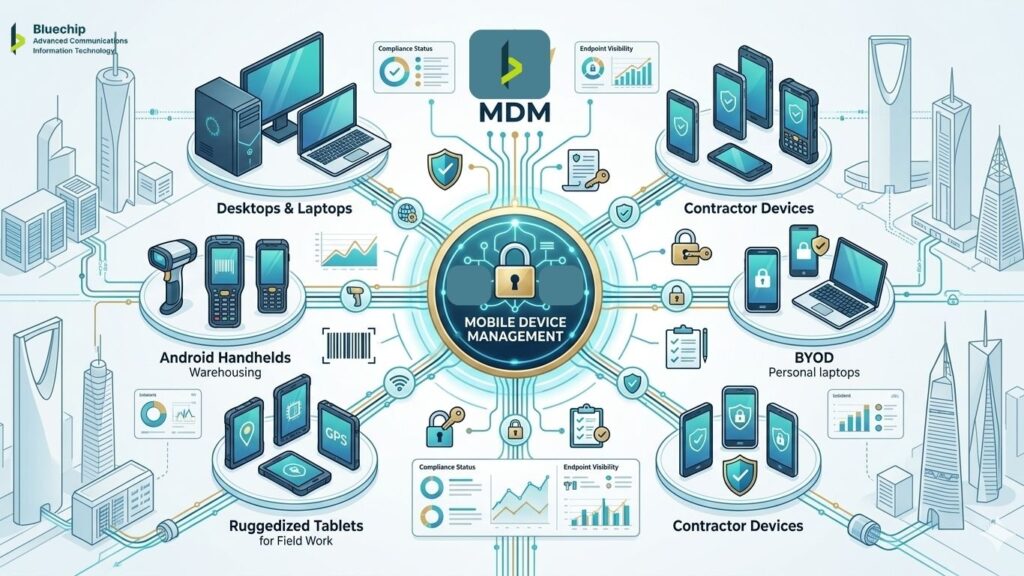
Saudi Arabia’s evolving data protection landscape adds further urgency. The Personal Data Protection Law (PDPL), administered by SDAIA, requires organizations to apply appropriate technical measures to protect personal data from unauthorized access, alteration, and breach. Unmanaged endpoints — where corporate data sits alongside personal apps, without encryption or remote wipe capability — represent one of the clearest technical gaps in PDPL readiness. Organizations should always engage qualified legal and compliance advisors for formal PDPL guidance; what MDM provides is the technical infrastructure that supports the protective measures those advisors recommend.
The National Cybersecurity Authority (NCA)’s Essential Cybersecurity Controls similarly emphasize endpoint protection and asset management as foundational requirements. Mobile device management is a direct operational response to these requirements at the device level.
Secure and Simplify Your Mobile Workforce Management
Mobile devices have become the backbone of modern business operations across Saudi Arabia. From Riyadh’s financial districts to Jeddah’s logistics hubs, organizations are managing thousands of smartphones, tablets, and IoT devices daily. Mobile Device Management (MDM) solutions help Saudi businesses maintain security, ensure compliance, and maximize productivity across their entire mobile fleet.
Swift Device Onboarding
Seamlessly enroll and authenticate both corporate and BYOD devices to quickly gain full visibility and control across your mobile ecosystem.
Policy Based Compliance
Enforce device compliance by configuring profiles with custom rules for Wi-Fi, VPN, security settings, and access policies.
Unified Device View
Gain complete visibility into your device ecosystem with a clean, intuitive dashboard that simplifies monitoring and management.
Real-Time Troubleshooting
Instantly access and control devices remotely to diagnose and resolve issues, reducing downtime and boosting IT support efficiency.

What unmanaged endpoints cost Saudi organizations:
- Lost or stolen devices containing unencrypted corporate data — with no remote wipe capability
- BYOD devices with corporate email and files that IT cannot audit or control
- Inconsistent security configurations across a device fleet spanning multiple sites and OS versions
- No visibility into patch status — leaving devices on outdated, vulnerable software
- IT teams spending hours on manual device troubleshooting across dispersed locations
- Non-compliance with internal policies and increasing external regulatory expectations
Ready to Take Control of Your Endpoint Estate?
Whether you are managing 50 devices across a single Riyadh office or thousands of endpoints across multiple KSA locations, Bluechip Saudi’s team will help you design and deploy an MDM solution that gives you real visibility, real control, and real peace of mind. The conversation starts with a free, no-obligation assessment of your current environment.
Book Your Free MDM Consultation
Simplified IT Operations
Automate device onboarding, updates, and compliance reporting saving time and reducing operational overhead.
Regulatory Compliance
How Bluechip Saudi Delivers MDM Solutions
Our Approach — From Assessment to Ongoing Support
Deploying an enterprise MDM solution is not simply a matter of purchasing a licence and pointing devices at a console. The organizations that get the most from endpoint management are those that begin with a clear architecture — the right enrollment method for their device types, the right policy structure for their security requirements, and the right integration with their existing IT infrastructure. That is exactly what Bluechip Saudi provides.
Our engagement | What it means for you |
Environment assessment | We review your current device estate — OS types, device ownership models, active directory structure, existing security tools, and compliance requirements — before recommending any platform or configuration. |
Solution design | We design your MDM architecture: enrollment workflows, device group structure, policy profiles, app management approach, content controls, and integration points with your existing identity and network infrastructure. |
Platform selection | We work with leading enterprise MDM and UEM platforms including 42Gears SureMDM. We recommend the platform best matched to your environment — and we are not locked into recommending any single vendor. |
Deployment & enrollment | Our Riyadh-based team manages the full deployment — configuring the console, setting up enrollment methods, migrating existing devices, and onboarding new device groups as your fleet grows. |
Training & handover | We train your IT team on day-to-day console management, troubleshooting, and policy updates — so you are not dependent on us for routine operations. |
Ongoing support | We provide local Arabic and English-language support for troubleshooting, policy changes, new device onboarding, and platform updates. Riyadh-based, not a remote helpline. |

Integration with Your Technology Ecosystem
Modern MDM solutions don’t operate in isolation. They integrate seamlessly with your existing identity management systems, security information and event management (SIEM) platforms, and productivity suites. This integration creates a unified security posture where mobile devices are managed consistently with your broader IT infrastructure.
For organizations using Microsoft 365, Google Workspace, or enterprise resource planning systems, MDM ensures mobile access remains secure and compliant. Conditional access policies verify device health before granting access to sensitive applications or data, creating an additional security layer beyond traditional username and password authentication.
What Your MDM Deployment Includes — Full Capability Reference
The enterprise MDM solutions experts deploy — including 42Gears SureMDM — deliver a comprehensive capability set across device management, application control, and security enforcement. The full feature set available through MDM deployments includes:
Device & endpoint control
- Bulk & zero-touch enrollment
- Dynamic device grouping
- BYOD profile separation
- Geo, network & time fencing
- Real-time device location
- Device health monitoring
- Real-time alerts & messaging
- Telecom usage management
- Camera access control
- Remote troubleshooting access
Application management
- Silent app installation & removal
- Enterprise app store
- App blocklists & allowlists
- App update automation
- Permission & usage controls
- Program execution control
- App lifecycle management
- BYOD app containerization
- Internal content distribution
- File encryption & expiry
Security & compliance
- Password policy enforcement
- Firewall rules enforcement
- Remote data wipe
- Patch management & OS updates
- VPN auto-configuration
- WiFi & hotspot management
- Secure screen sharing
- Call & SMS monitoring
- Shell command execution
- Compliance reporting
→ Talk to Us About MDM for Your Environment
Enterprise MDM Capabilities — Organized by What They Achieve for Your Business
A modern unified endpoint management platform delivers capability across six domains. Below is what each domain achieves — and how Bluechip Saudi deploys these capabilities for enterprises across the Kingdom.
1. Get every device under control — fast
Before you can manage a device, you must enroll it. Enterprise MDM solutions support multiple methods to bring devices into management quickly without physical access. For large deployments, zero-touch enrollment methods bring thousands of devices online simultaneously, pre-configured with the right policies, apps, and security settings the moment they are powered on.
Bluechip Saudi manages the enrollment architecture for your deployment. We select the right method for your device types, define grouping structures, and configure enrollment policies. Our platforms support zero-touch enrollment for Android and Apple, QR-code, NFC-based methods, OEM-specific programs, and manual enrollment for individual devices where needed.
2. Enforce security policy across every endpoint — automatically
The most valuable outcome of MDM is not visibility; it is automatic policy enforcement. Once a device is enrolled, every security rule applies instantly: Wi-Fi/VPN configurations, screen lock requirements, password complexity, and network access controls. When a device falls out of compliance, the platform restricts access or remediates the issue without a technician.
This eliminates the single biggest weakness in endpoint security: dependence on user behavior. By removing the human element, security policies enforce themselves consistently across the board. Your IT team shifts from manual monitoring to high-level oversight, ensuring that every managed endpoint remains a hardened, secure asset regardless of where the employee is working.
3. Control every application on every device
Application management through MDM gives your IT team full authority over software. Approved apps can be deployed silently from Google Play, Apple App Store, or internal libraries. Unapproved apps are blocked, and updates are pushed without user intervention. Furthermore, apps can be removed instantly when an employee leaves or a device is eventually reassigned.
For BYOD environments, we utilize container-based management. Corporate applications and data live in a secure, policy-governed workspace, completely separated from personal apps. When an employee departs, only the corporate workspace is wiped, leaving personal data untouched. This provides a professional balance between rigorous corporate security and essential user privacy.
4. Protect corporate data at the file level
Device-level MDM policy secures the operating environment. Content management goes one level deeper — applying protection directly to files, documents, and data distributed to devices. Enterprise content management through MDM allows your IT team to push files to device-based secure containers, apply encryption and authentication requirements before documents can be opened, restrict sharing and forwarding actions, set document expiry dates, and remotely remove corporate content from a device without touching personal data.
For organizations handling sensitive client records, contracts, financial data, or regulated information, this layer of data protection is particularly important in the context of PDPL’s requirements for appropriate technical safeguards. Qualified legal advisors should always be consulted for formal compliance assessment.
5. Know where every device is — and automate policies by location
Real-time device location tracking gives IT and operations teams visibility into where managed devices physically are — and where they have been. For logistics, field service, and multi-site organizations, this means knowing your driver’s current location, verifying a field engineer has reached a client site, or tracking high-value ruggedized equipment across multiple warehouses.
Location awareness also enables automated fencing policies — one of the most powerful capabilities in modern endpoint management. A network fence activates security policies the moment a device connects to your corporate Wi-Fi, and relaxes them when the device leaves. A geo-fence creates a virtual perimeter around a physical location — a building, a warehouse, a secure zone — and triggers pre-configured policy changes when devices enter or exit. A time fence enforces device restrictions outside of working hours automatically.
6. Prevent unauthorized photography in sensitive environments
Many Saudi enterprises — particularly in government, defense, financial services, R&D, and manufacturing — operate environments where unauthorized photography creates serious security and compliance risk. Enterprise MDM solutions include camera control functionality that can automatically disable smartphone cameras in designated zones, based on the device’s location, the user’s access status, or the time of day.
When integrated with your facility access or visitor management systems, camera blocking activates automatically as employees or visitors enter a controlled area, and restores access upon exit. No user action is required. No signage or honor-system reliance. The policy enforces itself at the device level.
MDM Across Saudi Arabia's Key Sectors
Mobile Device Management Requirements by Industry — Saudi Arabia
The specific MDM configuration your organization needs depends heavily on your sector, your device estate, and your operational environment. Here is how the core MDM capability set applies across the industries Bluechip Saudi serves:
Sector | Key endpoint management requirements |
Banking & financial services | Strict data security controls on client-facing devices; remote wipe for lost devices; BYOD separation for staff; camera control in trading floors and data rooms; audit-trail generation for regulatory review. |
Healthcare | Secure distribution of clinical records to ward tablets; content expiry on sensitive documents; camera control in patient care areas; BYOD policy for staff; device tracking across multi-building hospital estates. |
Logistics & supply chain | Real-time GPS tracking of driver and warehouse devices across KSA routes; rugged device management for warehouse operations; network fencing at distribution centres; app lockdown to approved logistics software. |
Government | Strict endpoint security policies for government-issued devices; camera blocking in secure zones; geo-fencing for restricted areas; bulk enrollment for large estates; full remote wipe capability. |
Manufacturing & industrial | Rugged device management for factory floor environments; camera blocking in IP-sensitive areas; time fencing outside operational hours; patch management for industrial tablets and PCs. |
Retail & hospitality | Kiosk and POS device lockdown; branded customer-facing terminals; centralized app management across multiple store locations; remote troubleshooting without on-site IT visits across KSA branches. |
Education | Managed deployment for student and staff tablets; content filtering and app restrictions; time fencing for class hours; secure distribution of digital learning materials; safe browsing enforcement. |
Mobile Device Management — Frequently Asked Questions
Note: The information on this page is provided for general guidance only. Software features and vendor specifications change over time. We recommend consulting with our team before applying any solution to your business or IT environment.