
What Is a Digital Workspace and How Does It Enable Secure Remote Work?

The shift to hybrid and remote working across Saudi Arabia has exposed a fundamental challenge in enterprise IT: most organizations built their technology infrastructure around the assumption that employees work from a fixed location, on a managed device, connected to a corporate network. That assumption is no longer valid for a significant portion of the workforce.
A Digital Workspace in Saudi Arabia is the architectural response to this reality. This guide explains what it is, how it differs from older remote working technologies, and what it actually delivers for organizations adopting flexible working models in Saudi Arabia.
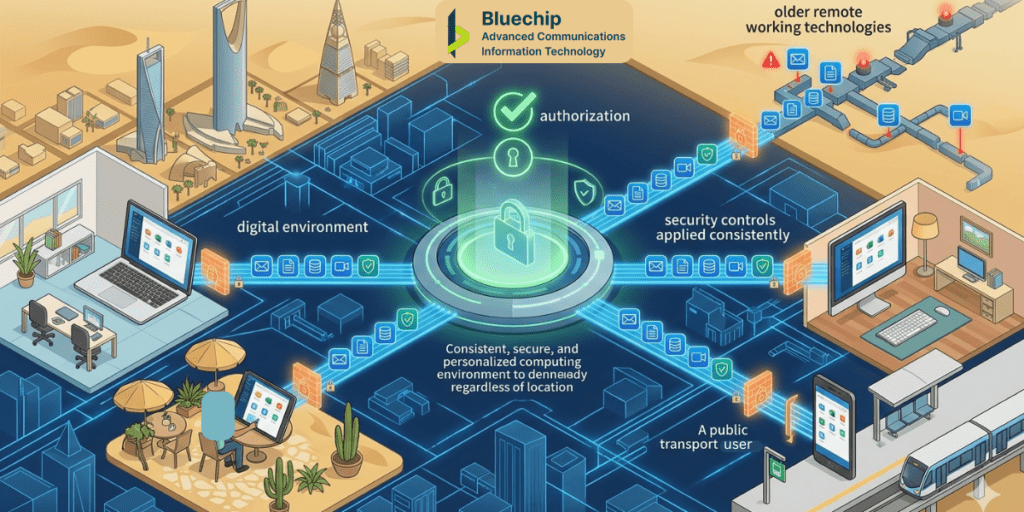
Quick Answer — What is a digital workspace? A digital workspace is a technology framework that delivers a consistent, secure, and personalized computing environment to employees regardless of their physical location, device, or network. Rather than tying a user’s working environment to a specific physical machine, a digital workspace makes that environment available from any authorized device — with the same applications, data access, and security controls applied consistently. |
Digital Workspace vs VPN vs VDI — Understanding the Differences
Traditional VPN
A VPN provides network-level access to corporate resources for remote users. The user’s applications still run on their local device — VPN simply provides a secure tunnel to reach corporate network resources. This means the user’s device needs to have the right applications installed and configured. If the device is lost, stolen, or compromised, corporate data on that device may be at risk.
VDI (Virtual Desktop Infrastructure)
VDI delivers a full virtual desktop to the user — the desktop and all its applications run on a server in the data centre, and the user sees and interacts with it through a remote display protocol. This centralization is powerful for data security (data stays in the data centre, not on the device) but traditional VDI deployments can be complex, expensive, and bandwidth-intensive.
Digital Workspace
A digital workspace combines the application flexibility of traditional computing with the centralization benefits of VDI, adding modern identity and access management, endpoint-agnostic delivery, and adaptive security controls. The user gets access to their full working environment — applications, files, and data — from any device, with security policies applied at the workspace level rather than the device level.
Core Capabilities of a Digital Workspace Platform
Application delivery from anywhere
Applications are delivered to users through the digital workspace regardless of the device they are using. Whether that is a managed corporate laptop, a personal phone, or a shared workstation, the same applications are available with consistent settings and data access. There is no need to install and maintain applications on individual devices.
End-user computer virtualization
End-user computer virtualization is the technology that makes device-agnostic application delivery possible. Rather than applications running directly on the user’s hardware, they run in a virtualized environment that is delivered to the user’s screen. This is sometimes called Desktop as a Service (DaaS) when delivered from cloud infrastructure.
End-user computer virtualization separates the user’s working environment from the physical device, meaning that if a device is lost or wiped, the user’s data and applications are unaffected — they simply log in from another device and resume work.
Centralized data security
In a digital workspace, corporate data does not live on the user’s device. It lives in the centralized environment — protected by the security controls applied at the data centre or cloud level. This dramatically reduces the risk of data loss from device theft, loss, or unauthorized access.
Adaptive security and access control
Digital workspace platforms apply context-aware access policies — evaluating the user’s identity, device compliance, location, and risk context before granting access to the workspace. Users connecting from unmanaged devices or unusual locations may face additional authentication requirements or restricted access profiles.
Consistent experience across devices
A digital workspace is designed to deliver a consistent user experience across device types — laptops, tablets, thin clients, and smartphones. This matters particularly for organizations supporting staff who move between locations, devices, and working contexts throughout their day.
Data Security and Data Loss Protection in a Digital Workspace
One of the strongest arguments for a digital workspace architecture from a data security perspective is that data does not leave the centralized environment unless explicitly permitted. Users work within the workspace, but files and data are stored centrally — not cached on local devices.
This architecture is a form of structural data loss protection. Even if a user’s device is compromised, the data they were working with is in the centralized workspace, not on the device. The attacker gets the device, not the data.
This is complemented by application-level controls within the workspace — clipboard restrictions, print controls, file transfer policies, and session recording — that prevent data from moving out of the protected environment through user actions.
Why Saudi Enterprises Are Adopting Digital Workspace Solutions
Saudi Arabia’s enterprise adoption of digital workspace solutions is being driven by several converging factors:
- Vision 2030’s digital transformation priorities are pushing organizations toward cloud infrastructure and flexible working models
- Growing mobile and remote workforces require secure access to enterprise applications from locations outside the corporate network
- Data protection considerations under PDPL require organizations to demonstrate technical safeguards on how personal data is accessed and stored
- The need to support contractors and vendors securely — giving external parties access to specific applications without exposing the broader corporate environment
- Cost optimization — digital workspace platforms can reduce endpoint hardware costs by extending the working life of older devices and enabling thin client deployments
Frequently Asked Questions — Digital Workspace
Q: What is a digital workspace in simple terms?
A digital workspace is technology that lets employees access all their work applications and data from any device and location — with the same consistent, secure experience they would have at their office desk. The applications and data are hosted centrally, not on the individual device.
Q: What is end-user computer virtualization?
End-user computer virtualization is the technology that delivers a user’s desktop or applications from a server rather than running them on the local device. The user sees and interacts with their applications normally, but the processing happens in a data centre or cloud environment. This separates the working environment from the physical hardware.
Q: What is the difference between VDI and a digital workspace?
VDI (Virtual Desktop Infrastructure) is one component that can be part of a digital workspace — it delivers a full virtual desktop to users. A digital workspace is a broader concept that includes application delivery, identity management, adaptive security, and content controls, not just virtual desktop delivery.
Q: How does a digital workspace improve data security?
In a digital workspace, data is stored centrally — not on the user’s device. Even if a device is lost or stolen, corporate data remains in the secure centralized environment. Application-level controls also prevent data from being copied, printed, or transferred outside the workspace without authorization.
Q: Can a digital workspace support BYOD employees?
Yes. Digital workspace platforms are designed to support BYOD environments — delivering corporate applications securely to personal devices without requiring full device management. Access controls and endpoint compliance checks apply to the workspace session, not the device itself.
Q: Is a digital workspace suitable for organizations currently using a VPN?
A digital workspace and ZTNA-based secure remote access can replace or complement a VPN. For organizations where VPN performance is a challenge, where BYOD access is difficult to manage, or where data security concerns exist around data on devices, a digital workspace architecture may provide a better-suited solution.
Next Steps:
A digital workspace assessment typically begins with mapping your current application landscape, your user population, and your device mix — before any platform is recommended. Bluechip Saudi’s advisory team works with enterprises across Saudi Arabia to design digital workspace architectures that match their specific working models, security requirements, and budget realities. Contact us to start the conversation.
General information note The content in this blog post is for general informational and educational purposes only. It does not constitute technical, legal, or compliance advice. Product features, regulatory frameworks, and technology capabilities evolve continuously — always verify current information with a qualified advisor before making decisions. References to regulatory frameworks are for general awareness only. |