
Secure Remote Access for Saudi Enterprises — A Practical Overview

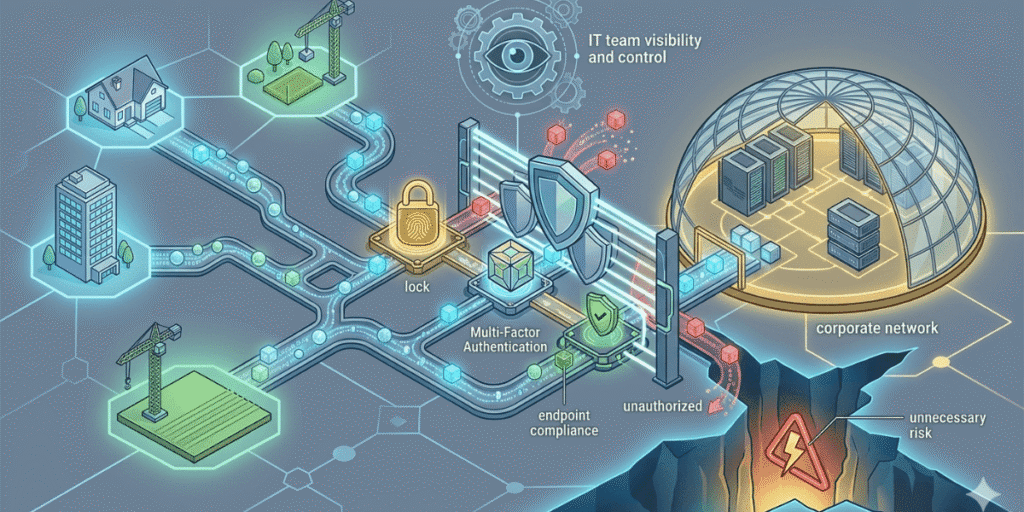
Engineers connect to internal systems from client sites. Finance teams access ERP platforms from home. Contractors log into project management tools from their own devices. Executives check dashboards while travelling.
The question is no longer whether employees will access corporate systems remotely. The question is whether that access is secure — and whether your IT team has visibility and control over it when it happens.
Quick Answer — What is secure remote access? Secure remote access is the set of technologies and policies that allow authorized users to connect to corporate applications, data, and systems from outside the corporate network — safely, verifiably, and without exposing internal infrastructure to unnecessary risk. It includes technologies such as zero trust network access (ZTNA), VPNs, multi-factor authentication, and endpoint compliance checking. |
Table of Contents
VPN vs Zero Trust Network Access — Understanding the Difference
For many years, VPN (Virtual Private Network) was the default answer to remote access. A VPN creates an encrypted tunnel between the user’s device and the corporate network, giving remote users access to internal resources as if they were sitting in the office.
The problem with this model is exactly that: it treats remote users as if they were in the office. Once a VPN connection is established, the user has network-level access to everything that network reaches. If a VPN credential is compromised, the attacker has that same broad access.
Zero trust network access (ZTNA) takes a fundamentally different approach. Rather than granting network-level access, ZTNA grants application-level access — to specific applications, based on verified identity, device compliance status, location, and risk context. A user with ZTNA access can reach the specific application they need. They cannot browse the internal network looking for other resources.
The practical difference for Saudi enterprises:
- VPN: one compromised credential can expose the entire internal network
- ZTNA: access is limited to specific, authorized applications — lateral movement is blocked by design
- VPN: no inherent device compliance checking before granting access
- ZTNA: endpoint health is verified before each session — unmanaged and non-compliant devices are denied access
- VPN: scaling for large remote workforces requires significant infrastructure investment
- ZTNA: scales easily for remote, hybrid, and BYOD user populations
What Secure Remote Access Delivers in Practice
A well-deployed secure remote access solution delivers several capabilities that directly address the risks of remote and hybrid working:
Application-specific access control
Users can access only the applications they are authorized to use — not the broader network. A customer service team member gets access to the CRM and helpdesk platform. A developer gets access to the code repository and testing environment. Access boundaries are defined by role and enforced technically, not just by policy.
Identity verification at every session
Every remote access session requires verified identity — through multi-factor authentication combined with identity and access management controls. Even if a user’s password is compromised, an attacker cannot complete authentication without the second factor. Context-aware policies can require additional verification when access is attempted from unusual locations or devices.
Endpoint compliance checking
Before a remote session is established, the connecting device is checked for compliance — antivirus status, OS patch level, encryption, and device registration. Devices that do not meet the defined compliance standard can be denied access, quarantined, or prompted to remediate before being allowed to connect. This is particularly important for BYOD devices and contractor-owned hardware.
Session visibility and audit logging
Every remote session is logged — user identity, application accessed, device details, connection time, and location. This audit trail supports security monitoring, incident investigation, and compliance documentation. Anomalous activity — logins from unexpected locations, access at unusual hours, repeated failed authentication — can trigger real-time alerts.
BYOD and Contractor Access — The Particular Challenge for Saudi Enterprises
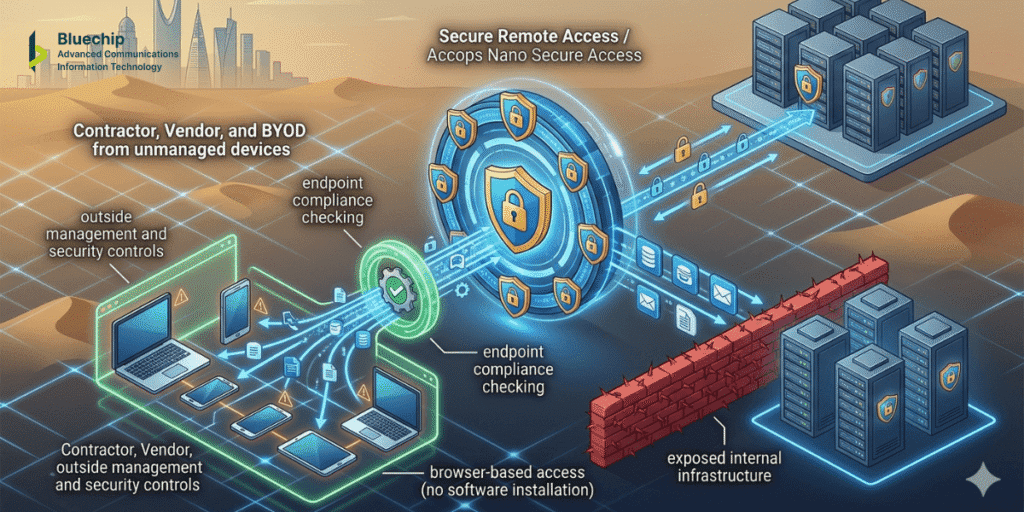
One of the most complex remote access scenarios for Saudi IT teams is managing access for users who do not use corporate-issued devices. Contractors, vendors, and BYOD employees need access to specific internal applications — but their devices sit outside the organization’s direct management and security controls.
Secure remote access solutions address this through a combination of browser-based access (which does not require software installation on the remote device) and endpoint compliance checking (which verifies minimum security standards before granting access). Solutions such as Accops Nano Secure Access are designed specifically for this scenario — providing lightweight, secure access to corporate applications for BYOD users and contractors without exposing internal infrastructure or requiring full device enrollment.
Accops HySecure — Zero Trust Remote Application Access
For organizations deploying ZTNA in, Accops HySecure is a zero trust remote application access gateway that delivers secure, seamless access to corporate applications and desktops from any device and network. It supports web, SaaS, legacy, client-server, and virtual applications — making it suitable for the mixed application landscapes common in Saudi enterprises.
HySecure establishes a software-defined perimeter (SDP) architecture, with Layer 4–7 application tunneling that provides secure access without requiring changes to network or endpoint configurations. It is delivered by Bluechip Saudi as an authorized IT solutions provider in the KSA market.
Key Management Solutions and Remote Access Security
Secure remote access in Saudi Arabia is strengthened when the encryption protecting remote sessions is backed by proper key management. Hardware security modules (HSMs) and enterprise key management solutions ensure that the cryptographic keys protecting remote access sessions and data in transit are stored, rotated, and accessed according to security best practices — preventing scenarios where encryption protects data but the keys themselves are inadequately secured.
How to Evaluate Secure Remote Access Solutions
- Does it support your specific application types — web, SaaS, legacy, client-server?
- Does it enforce endpoint compliance checking before granting access?
- Does it integrate with your existing identity and access management infrastructure?
- Does it provide browser-based access for BYOD and contractor users?
- Does it scale for the size and distribution of your remote workforce?
- Is local deployment and support available in Saudi Arabia?
Frequently Asked Questions (FAQs) — Secure Remote Access
Q: What is the difference between a VPN and zero trust network access (ZTNA)?
A VPN grants network-level access — once connected, users can typically reach any resource on that network. ZTNA grants application-level access — users can only reach the specific applications they are authorized for, not the broader network. ZTNA also verifies device compliance before each session, which VPNs typically do not.
Q: Can secure remote access solutions support BYOD devices?
Yes. Modern secure remote access solutions support BYOD through browser-based access (requiring no software installation) and lightweight client options designed for personal devices. Endpoint compliance checking applies minimum security standards without requiring full device enrollment.
Q: Is multi-factor authentication required for secure remote in access in Saudi Arabia?
MFA is a strongly recommended component of any secure remote access in Saudi Arabia deployment. It ensures that a stolen password alone is insufficient to establish a remote session. Most enterprise ZTNA solutions include MFA as a core component.
Q: What applications can be accessed through ZTNA?
Enterprise ZTNA platforms typically support web applications, SaaS applications, legacy client-server applications, virtual desktops, RDP, SSH, file shares, and email servers. The range of supported application types varies by platform.
Q: How does secure remote access support data protection obligations under PDPL?
Secure remote access controls who can access systems holding personal data, from which devices, and under what conditions. Combined with audit logging, this supports the technical safeguard and accountability documentation relevant to PDPL requirements. Legal and compliance advisors should be consulted for formal guidance.
Q: What is Accops Nano Secure Access?
Accops Nano Secure Access is a lightweight secure access solution designed specifically for BYOD users and contractors — providing controlled access to corporate applications without requiring full device enrollment or MDM management. It is particularly suited to organizations needing to give external users access to specific internal applications safely.
Next Steps
Whether your organization is replacing an aging VPN, deploying remote access for the first time, or addressing BYOD and contractor access gaps, Bluechip Saudi’s advisory team can help you assess your current environment and identify the right approach. Contact us for a free consultation — Let us understand your situation.
General information note The content in this blog post is for general informational and educational purposes only. It does not constitute technical, legal, or compliance advice. Product features, regulatory frameworks, and technology capabilities evolve continuously — always verify current information with a qualified advisor before making decisions. References to regulatory frameworks are for general awareness only. |