
Cloud Migration in Saudi Arabia: A Practical Planning Guide for IT Teams

Table of Contents
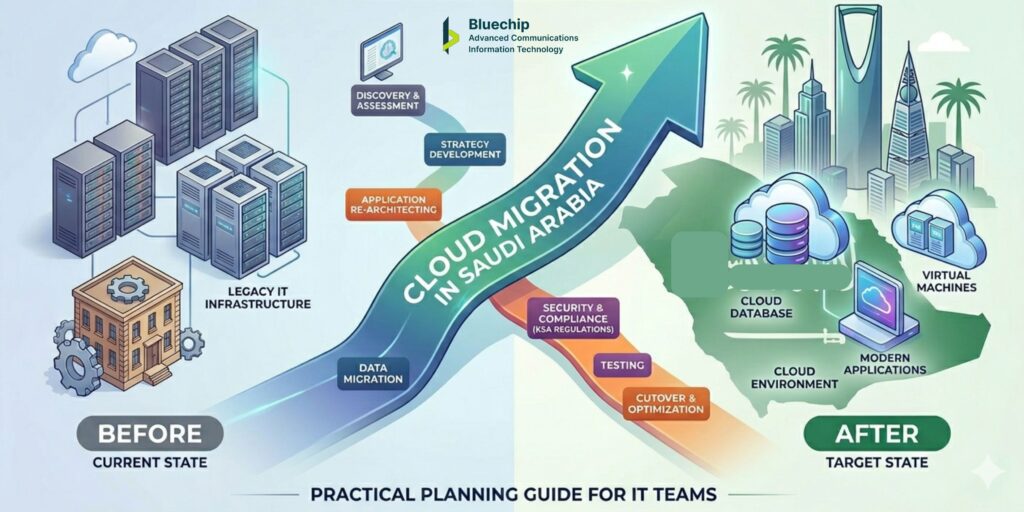
Quick Answer — What Is Cloud Migration?
☁️ Cloud migration is the process of moving an organisation’s applications, data, and workloads from on-premises infrastructure to a cloud environment — either public cloud, private cloud, or a hybrid combination of both. |
Migration is not a single action. It is a structured programme of work that involves assessment, planning, phased execution, testing, and post-migration management. |
The goal is not simply to put existing systems in the cloud, but to ensure that the new environment serves the organisation better than the old one — whether through improved scalability, reduced operational overhead, better availability, or stronger security. |
Stage 1: Discovery — Understand What You Have Before You Plan What to Move
The most common mistake in cloud migration projects is starting with the destination — choosing a cloud provider and planning deployment — before thoroughly understanding the starting point.
A proper discovery phase answers several critical questions:
- Application inventory: What applications are running, and what do they do? Which are business-critical, which are internal tools, and which are candidates for retirement rather than migration?
- Dependency mapping: How do applications connect to each other? Migrating one application without understanding its dependencies on others creates integration problems that are expensive to fix after the fact.
- Data classification: What data does each application handle? Where does it live, how sensitive is it, and what considerations apply to where it can be stored and who can access it?
- Infrastructure assessment: What is the current state of the on-premises infrastructure? What is end-of-life, what is over-provisioned, and what has capacity to continue running?
- Performance baseline: How do applications currently perform? This baseline is essential for validating after migration that performance in the cloud meets or exceeds the on-premises benchmark.
Discovery takes time and requires input from application owners across the business — not just the IT team. Skipping it, or doing it superficially, is the most reliable way to encounter expensive surprises mid-migration.
Stage 2: Migration Strategy — One Size Does Not Fit All
Once you understand what you have, the next question is how each workload should move. Cloud migration strategy is not a single decision — it is a workload-by-workload assessment.
The most commonly used framework for migration strategy describes several approaches:
Migration Approach | What It Means | When to Use It |
Rehosting (Lift & Shift) | Moving the application to cloud with minimal changes | Applications that are not cloud-native but are stable and do not need re-architecting |
Replatforming | Minor optimisations during migration — for example, moving a database to a managed cloud database service | Applications that benefit from cloud capabilities without requiring full redesign |
Refactoring | Redesigning the application to use cloud-native features — microservices, auto-scaling, serverless functions | High-priority applications where cloud capability creates significant operational or cost benefit |
Retaining | Keeping the application on-premises, at least for now | Applications with low cloud suitability, specific latency requirements, or regulatory considerations |
Retiring | Decommissioning applications that are no longer needed | Legacy tools where the function is now covered by another application or is no longer required |
A realistic migration plan assigns an approach to each workload and sequences the migration in a way that moves the least complex and least critical workloads first — building team experience and confidence before tackling business-critical systems.
Stage 3: Designing for Hybrid — When Not Everything Goes to Cloud
The conversation about cloud migration is often framed as a binary: move to cloud or stay on-premises. In practice, most enterprise migrations result in a hybrid environment — some workloads in cloud, some on-premises — and that hybrid state is often not temporary. It reflects the genuine operational reality of the organisation.
Designing for hybrid from the start — rather than treating it as a compromise — produces better outcomes. Key design considerations include:
- Network connectivity: How will on-premises systems connect to cloud-hosted workloads? Public internet connections are simple but introduce latency and security considerations. Private, dedicated connectivity is more reliable but adds cost and setup time.
- Identity management: How will users authenticate across both environments? A unified identity and access management (IAM) approach that works consistently in both on-premises and cloud contexts avoids the fragmentation that creates both security gaps and user friction.
- Data synchronisation: When data needs to be consistent across both environments, how is that synchronisation managed? What happens if connectivity between environments is temporarily disrupted?
- Security policy consistency: Security controls should apply consistently regardless of where a workload runs. A policy that works on-premises but does not extend into the cloud creates exploitable gaps.
Hybrid cloud architecture is not more complex than full cloud migration for its own sake — it is the right answer when the operational and practical reality of the organisation calls for it.
Stage 4: Security First — What Changes When Workloads Leave the Perimeter
Cloud migration fundamentally changes the security model. In an on-premises environment, much of the security architecture is built around controlling the network perimeter — the boundary between the internal network and the outside world. In a cloud environment, that boundary no longer functions the same way.
Users access cloud resources from multiple locations and devices. Applications integrate with external services. Data moves across networks and environments. Security in this context requires deliberate design, not perimeter assumptions.
Zero Trust as a Foundation
Zero trust is the security principle that addresses this shift most directly. Rather than trusting users and devices because they are on the corporate network, zero trust requires every access request to be verified — based on identity, device health, and context — regardless of origin.
For a cloud migration in Saudi Arabia, designing zero trust principles into the cloud environment from the start is significantly easier than trying to retrofit them after deployment. Key zero trust elements in a cloud context include:
- Strong multi-factor authentication for all access to cloud resources
- Identity and access management policies that enforce least-privilege access
- Device posture checks before cloud access is granted
- Network micro-segmentation to limit lateral movement within the cloud environment
- Continuous monitoring and anomaly detection across cloud activity logs
Privileged Access Management in Cloud
Cloud environments introduce a new category of privileged access: cloud console and API access. An account with administrative access to a cloud platform can modify, delete, or expose the entire environment. Privileged access management (PAM) controls for cloud administration accounts — including just-in-time access, session recording, and approval workflows — are an important part of cloud security architecture.
Network Security for Cloud-Hosted Applications
Applications hosted in the cloud and accessible from the internet need specific network security controls. Web application firewall (WAF) protection, DDoS mitigation, and careful management of what services and ports are publicly exposed are all part of a responsible cloud security posture. Network security in cloud should be designed as part of the migration architecture, not added after deployment.
Stage 5: Execution — Running the Migration Without Disrupting the Business
Even a well-planned migration can create operational disruption if execution is not carefully managed. Several practices reduce this risk:
- Phase the migration: Move workloads in groups, starting with the least critical. Each phase builds team experience and provides a checkpoint for reviewing what is working and what needs adjustment.
- Maintain rollback capability: Until a migrated workload is validated and stable in the cloud environment, keep the on-premises version available as a fallback. Decommission on-premises systems only after the cloud version has been confirmed stable.
- Test before cutover: Each workload should be tested thoroughly in the cloud environment before it becomes the live version. Testing should cover functionality, performance, integration with other systems, and security configuration.
- Communicate with the business: Migration activities that affect user-facing systems should be communicated clearly in advance. Unexpected changes to how applications behave create helpdesk load and user frustration.
- Document changes: Maintaining accurate documentation of the cloud environment configuration is essential for ongoing IT service management. Document as you build — retrofitting documentation after the fact is harder and often incomplete.
Stage 5: Execution — Running the Migration Without Disrupting the Business
Even a well-planned migration can create operational disruption if execution is not carefully managed. Several practices reduce this risk:
- Phase the migration: Move workloads in groups, starting with the least critical. Each phase builds team experience and provides a checkpoint for reviewing what is working and what needs adjustment.
- Maintain rollback capability: Until a migrated workload is validated and stable in the cloud environment, keep the on-premises version available as a fallback. Decommission on-premises systems only after the cloud version has been confirmed stable.
- Test before cutover: Each workload should be tested thoroughly in the cloud environment before it becomes the live version. Testing should cover functionality, performance, integration with other systems, and security configuration.
- Communicate with the business: Migration activities that affect user-facing systems should be communicated clearly in advance. Unexpected changes to how applications behave create helpdesk load and user frustration.
- Document changes: Maintaining accurate documentation of the cloud environment configuration is essential for ongoing IT service management. Document as you build — retrofitting documentation after the fact is harder and often incomplete.
What to Look for in a Cloud Solutions Provider in Riyadh
Choosing the right technology solutions provider for a cloud migration in Saudi Arabia involves more than comparing vendor partnerships and price lists. Practical criteria to evaluate include:
- Documented experience with migrations of similar scale and complexity to yours
- Hybrid cloud design capability — not just public cloud deployment
- A security approach that is integrated into the migration methodology, not sold separately
- Local presence and support capability — remote-only support creates practical challenges for on-premises integration work
- Managed services capability for post-migration infrastructure support
- Clear engagement model — how the project is structured, what decisions you retain, and how changes are managed
- References from comparable organisations in the region
A reliable indicator of a capable partner is how they approach the initial engagement: a provider who asks detailed questions about your environment, your operational requirements, and your internal capacity before proposing anything is more likely to produce a successful outcome than one who moves quickly to proposal.
Frequently Asked Questions- (FAQs)
1. Where should I start if I have never done a cloud migration before?
Start with discovery — understanding what applications and infrastructure you currently have, how they connect, and what each one actually needs. This creates the foundation for every decision that follows. Without it, migration plans are built on assumptions that frequently prove incorrect once execution begins.
2. How do I decide which workloads to move to cloud first?
A common approach is to start with workloads that are low-risk (not business-critical), relatively self-contained (few dependencies on other systems), and well-understood. This builds team experience and confidence before tackling more complex or critical systems. Development and test environments, internal tools, and archival storage are frequent starting points.
3. What is the difference between cloud migration and cloud-native development?
Cloud migration refers to moving existing applications and infrastructure from on-premises to cloud environments. Cloud-native development refers to building new applications from the ground up using cloud-specific capabilities — microservices architecture, containers, serverless functions, and managed cloud services. Both involve cloud, but they start from different points and involve different types of work.
4. How do I handle applications that cannot be migrated?
Not all applications are suitable for cloud migration. Some may have specific hardware dependencies, network latency requirements, or integration constraints that make cloud deployment impractical. In these cases, the right approach is to retain them on-premises and design the cloud environment to integrate with them securely — which is exactly what hybrid cloud architecture addresses.
5. What are the biggest risks in a cloud migration project?
The most common risks are: data loss or corruption during migration if not properly validated; service disruption during cutover if not carefully planned; security gaps if cloud access controls are not properly configured; unexpected costs if the cloud environment is not sized and managed effectively; and integration failures if application dependencies were not fully mapped in the discovery phase. Each of these risks is manageable with proper planning and phased execution.
6. How long before we see the benefits of moving to cloud?
This depends on what benefits you are targeting and how the migration is executed. Infrastructure cost savings from retiring on-premises hardware become visible once those systems are decommissioned. Operational benefits from managed cloud infrastructure — reduced internal maintenance burden — are felt as the managed services arrangement matures. Scalability benefits are available from the point the cloud environment is live. Performance improvements depend on optimisation work that often continues for months after migration.
7. Is it possible to move back from cloud to on-premises?
Yes, though it is rarely the right answer and involves significant effort. A better approach is to design the cloud environment carefully from the start — with appropriate exit provisions, data portability, and documentation — so that you retain flexibility if requirements change. Complete dependency on a single cloud provider without any portability planning creates operational risk over the long term.
What to do now?
If your organisation is assessing a cloud migration or building a plan for moving workloads to a cloud or hybrid environment, the starting point is a structured understanding of your current infrastructure and your business objectives. Reach out to discuss where you are in the process, and we will give you a clear, practical view of what the work involves.